1
/
von
6
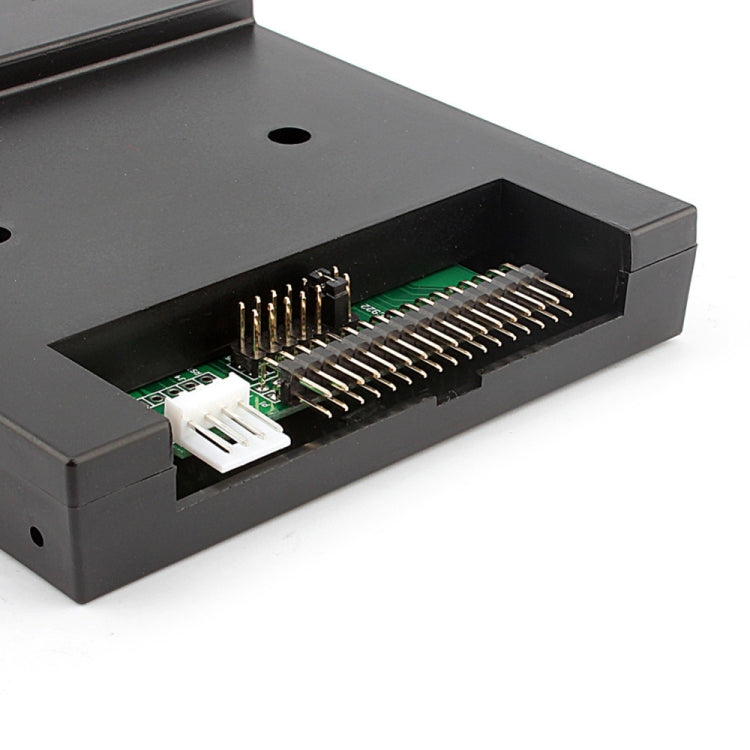
SFR1M44-U100K Floppy Disk Drive to USB Emulator Simulation 500 kbps for Musical Keyboard
No reviews
Normaler Preis
£29.10
Normaler Preis
Verkaufspreis
£29.10
Versand wird beim Checkout berechnet
Auf Lager
Free Shipping Tracked
Estimated delivery: Dec 2 - Dec 12
Anzahl
Verfügbarkeit für Abholungen konnte nicht geladen werden
✓ Your Purchase is Protected
Join 40,000+ happy customers who shop risk-free
Free Worldwide Shipping Tracked
Ships in 1-3 days • Save £8.99
6-Month Guarantee Protected
Manufacturing faults covered
30-Day Easy Returns Risk-Free
Changed your mind? Full refund
Secure Checkout SSL
Your payment info is protected
✓ 40,000+ customers trust us with their purchases
• Product type: Floppy Drives
• Compatibility: Musical Keyboard
• Material: ABS
• Key feature: USB interface
• Color/Variant: Black
• Intended use: Everyday use
• Category: Computer Components
Application: Emulator Interface Type: USB Type: Internal Model Number: Floppy Disk Drive USB Floppy Emulator: Floppy Disk Product Features: This floppy drive emulator is great for electronic organ. Floppy driver with below function needed: Floppy driver with 34pin interface, and 5V DC power plug. Use 2HD floppy disk with 1.44MB capacity. Format of disk: Cylinders: 80 Tracks: 160 Sectors/Track: 18 Bytes/Sector: 512 Data Transfer rate: 500 kbps Encoding method: MFM. Features: Use normal usb flash drive as the medium for transfer design. 34pin floppy driver interface, 5V DC power supply, easy to install. Capacity: 1.44MB 2HD Cylinders: 80 Tracks: 160 Sectors/Track: 18 Bytes/Sector: 512 Data Transfer rate: 500 kbps Encoding method: MFM. 1000pcs partitions in usb flash drive can be used. Built-in self-format function. (read relevant documents to use this function) Jumpers with function for different machines (SFR1M44-U100K not support jumpers). Panel: 8 segment numbers: represent partitions number Green led: status of read and write operation USB port: connect usb flash drive Button: Left button used to rise ten-digit, right button used to rise single-digit, press 2 buttons together to rise hundred-digit. Operation: Format usb flash drive. 1. use built-in self-format function to format usb flash drive into 1000pcs partitions 2. install an emulator on computer, and format every partition by operating driver A. 3. use emulator UFA1M44-100, plug usb flash drive on it, connect to computer, it will be recognized as removable driver A or B under WINDOWS XP/2000/7, format every partition. UFA1M44-100 also built in self-format function. Read and write data. 1. install emulator on machine 2. install emulator on computer 3. connect usb flash drive on computer, read and write data directory by software, under WINDOWS XP/2000/4. use emulator UFA1M44-100, plug usb flash drive on it, connect to computer, read and write data under WINDOWS XP/2000/7.
• Compatibility: Musical Keyboard
• Material: ABS
• Key feature: USB interface
• Color/Variant: Black
• Intended use: Everyday use
• Category: Computer Components
Application: Emulator Interface Type: USB Type: Internal Model Number: Floppy Disk Drive USB Floppy Emulator: Floppy Disk Product Features: This floppy drive emulator is great for electronic organ. Floppy driver with below function needed: Floppy driver with 34pin interface, and 5V DC power plug. Use 2HD floppy disk with 1.44MB capacity. Format of disk: Cylinders: 80 Tracks: 160 Sectors/Track: 18 Bytes/Sector: 512 Data Transfer rate: 500 kbps Encoding method: MFM. Features: Use normal usb flash drive as the medium for transfer design. 34pin floppy driver interface, 5V DC power supply, easy to install. Capacity: 1.44MB 2HD Cylinders: 80 Tracks: 160 Sectors/Track: 18 Bytes/Sector: 512 Data Transfer rate: 500 kbps Encoding method: MFM. 1000pcs partitions in usb flash drive can be used. Built-in self-format function. (read relevant documents to use this function) Jumpers with function for different machines (SFR1M44-U100K not support jumpers). Panel: 8 segment numbers: represent partitions number Green led: status of read and write operation USB port: connect usb flash drive Button: Left button used to rise ten-digit, right button used to rise single-digit, press 2 buttons together to rise hundred-digit. Operation: Format usb flash drive. 1. use built-in self-format function to format usb flash drive into 1000pcs partitions 2. install an emulator on computer, and format every partition by operating driver A. 3. use emulator UFA1M44-100, plug usb flash drive on it, connect to computer, it will be recognized as removable driver A or B under WINDOWS XP/2000/7, format every partition. UFA1M44-100 also built in self-format function. Read and write data. 1. install emulator on machine 2. install emulator on computer 3. connect usb flash drive on computer, read and write data directory by software, under WINDOWS XP/2000/4. use emulator UFA1M44-100, plug usb flash drive on it, connect to computer, read and write data under WINDOWS XP/2000/7.
Have questions about this product? Need help choosing? Contact our support team for assistance!
Share
